
· Diego Martin · engineering · 12 min read
Event Modeling: a shared blueprint for building software
An introduction to Event Modeling, its elements and patterns, and how it connects business decisions to automation, vertical slices, and AI-assisted development.
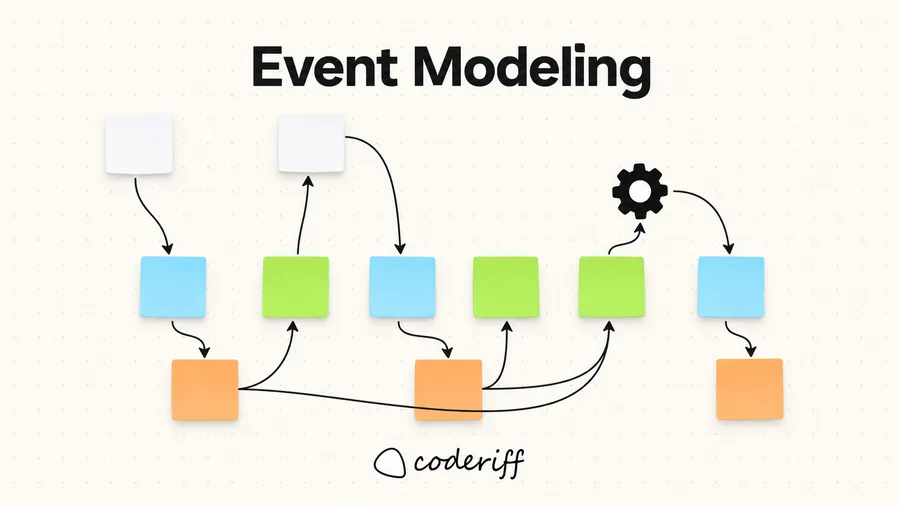
Building software requires agreement about how a system should behave. A requirement such as “ship the order when all products have arrived” sounds straightforward, but leaves questions unanswered. Which products are expected? How are arrivals associated with an order? What information tells us the order is ready? What happens if the products arrive in a different sequence?
Event Modeling makes those questions visible. It provides a shared blueprint of how information enters a system, changes over time, and supports the decisions that follow. Business experts, designers, developers, and testers can use that blueprint to discuss the same behavior before implementation begins.
What is Event Modeling?
Event Modeling describes an information system through concrete examples of information changing over time. Developed by Adam Dymitruk, it connects events on a timeline with the actions that produce them and the information needed by people and automated processes. His original introduction explains the approach in detail.
An event model follows a story through the system. It shows what a person sees, what they ask the system to do, what happens as a result, and how the resulting information becomes available for the next decision. Screens and processors sit alongside commands, events, and views to make that flow explicit.
Consider the warehouse fulfillment part of an eCommerce business. An order requires several products. Those products arrive at the warehouse separately, and the order must wait until all required products are available before it can be shipped. The model describes how the warehouse learns what to expect, records arrivals, and determines when to issue Ship Order.
You can apply Event Modeling to an event-sourced system or one that stores current state in a conventional database. Modeling a business event does not require publishing a message or persisting that event in an event store. The guide to Event Modeling with traditional systems explores this distinction.
Why make the information flow explicit?
Requirements often describe an action without explaining where the information needed to perform it comes from. “Ship when everything has arrived” assumes that the system knows both what “everything” includes and what “arrived” means for this particular order.
Drawing that information flow exposes missing pieces. If a view shows the products still outstanding, we must explain where the expected product list originated and how each arrival updates it. If a processor sends Ship Order, we must explain which state makes that decision appropriate.
This creates a practical basis for collaboration. A warehouse expert can question a rule, a designer can identify missing information on a screen, and a tester can describe an exception using the same model. Concrete examples make disagreements easier to resolve than broad statements such as “the system handles fulfillment.”
The five elements
The following five elements describe the information and decisions involved in a workflow:
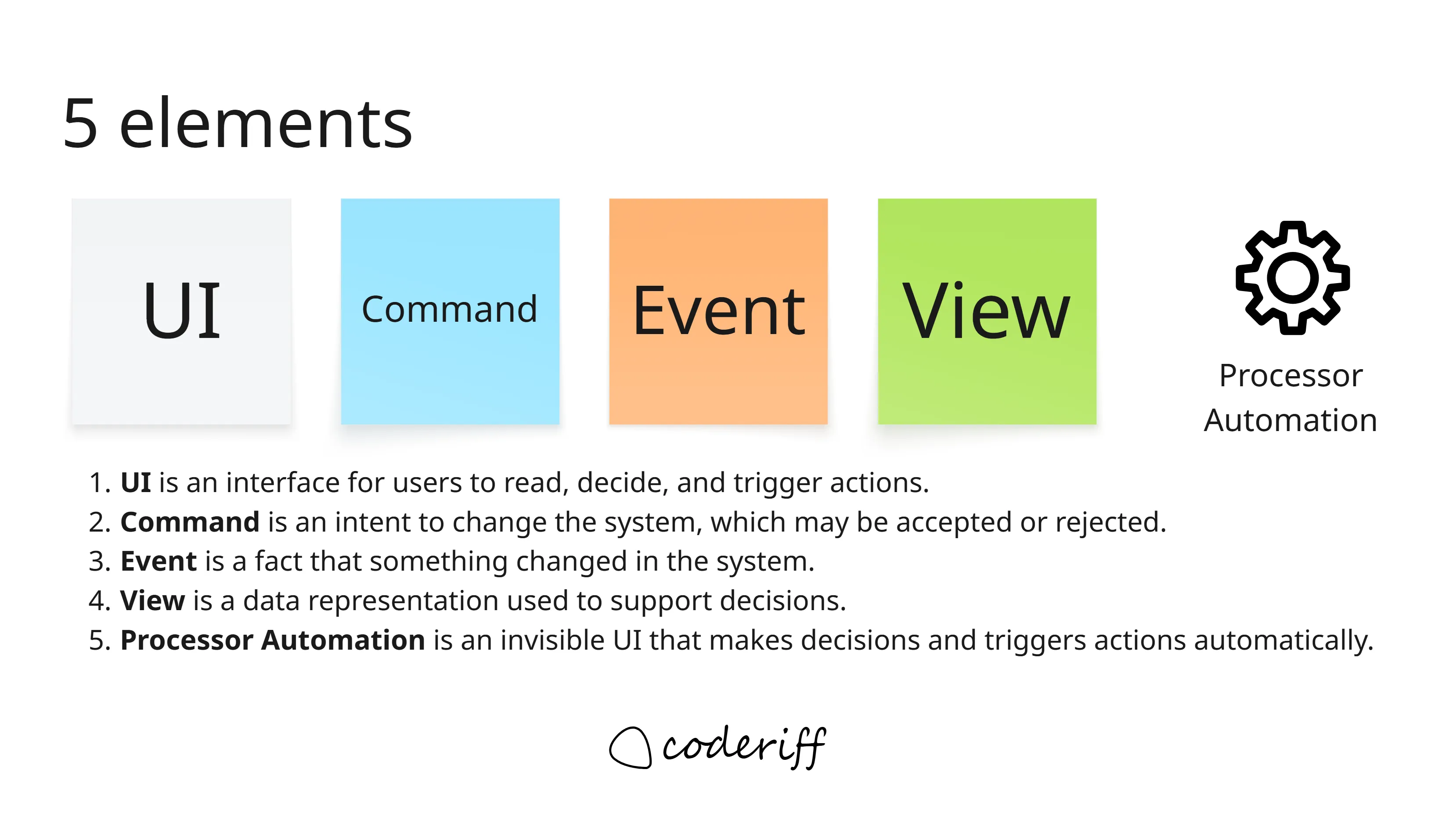
UI gives a person information and a way to act. A warehouse receiving screen might show an expected delivery and let an operator record a product arrival. A rough wireframe is enough to establish what the person needs to see and do.
Command expresses an intention to change the system. Record Product Arrival and Ship Order are requests that can be accepted or rejected according to business rules.
Event describes something that happened. Product Arrived and Order Shipped are facts expressed in the past tense. The distinction matters: requesting shipment does not mean the order has shipped.
View, also called a read model, represents information used to support a decision. An Orders Awaiting Products view could show the required products and the quantities still missing for each order.
Processor automation uses that information to decide when to send a command. It can observe that an order has all its required products and issue Ship Order. The command handler remains responsible for enforcing the rules governing that operation.
Together, these elements distinguish what someone intends, what happened, what is known, and what action should follow.
The four patterns
These elements combine into four recurring patterns. The diagram below shows their information flow; the Event Modeling cheat sheet provides another reference.
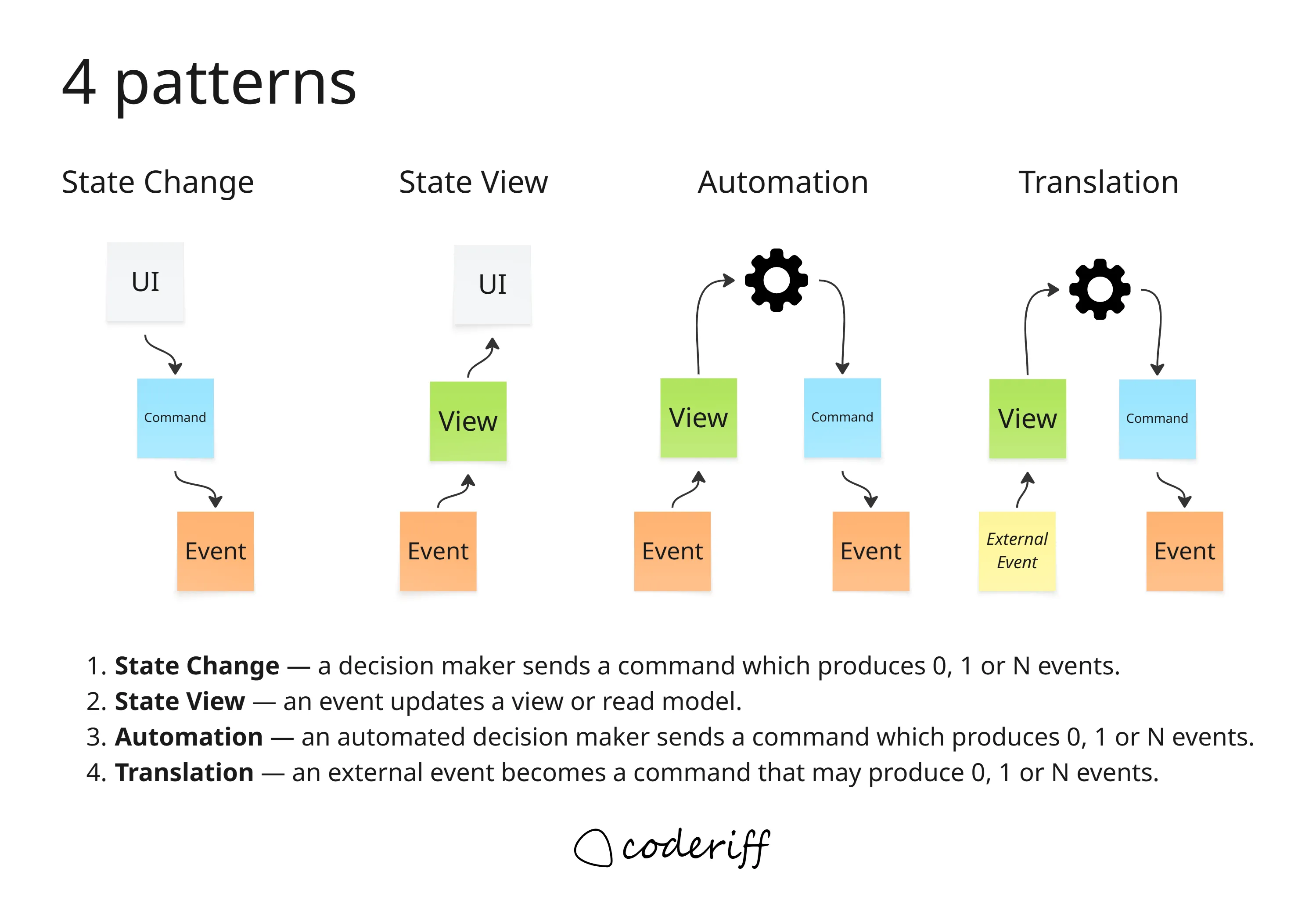
State change
A person or processor sends a command. Handling it may produce zero, one, or several events.
For example, a warehouse operator submits Record Product Arrival. If the arrival is valid, the system records Product Arrived, including the product identity, quantity, and the information needed to associate it with the expected fulfillment work.
State view
Events supply information to a view. Order Fulfillment Requested establishes the products and quantities required for an order. Product Arrived contributes information about what has become available.
The resulting view lets someone answer: “Which products are still missing for this order?”
Automation
A processor observes a view and sends a command when the relevant conditions are met. When an order has all its required products and shipment is still pending, the processor issues Ship Order.
Translation
Translation brings information from another system or context into our domain’s language. A supplier’s delivery notification might lead to a Record Product Arrival command, which, if accepted, produces Product Arrived in the warehouse’s model. This translation acts as an Anti-Corruption Layer (ACL), protecting our model from the supplier’s terminology and representation.
Sometimes, however, we only need external information to support a decision or validation. We might maintain a local view of a supplier’s product catalog, for example. Updating that view is also projection: it keeps a local representation of information owned elsewhere, without necessarily initiating a business operation in our domain. The supplier remains the source of truth. Reading from it directly or maintaining an eventually consistent cache is an implementation choice, although the acceptable freshness of that information must be part of the decision rules.
The Event Modeling HCL patterns guide explores these four patterns further.
A view is conceptual
A view describes information needed for a decision. Its green sticky note does not prescribe a storage mechanism.
It could be implemented as a database table, a query result, a physical file, an object, or even a variable in memory. It might be persisted or calculated when needed. The implementation must meet the system’s operational needs, but the model first establishes what the information means.
For Orders Awaiting Products, that means identifying the order, its expected products and quantities, what has arrived for it, and whether shipment remains outstanding. We can discuss those requirements before choosing where the information lives.
Views also serve automated processes. Information does not need to appear on a screen to deserve an explicit place in the model.
Automation makes decisions from state
A common question is whether automation reacts to a view or directly to an event. In the event model, there must always be a view (the green sticky) between the events and the processor automation. That view makes explicit the information the processor automation needs to decide whether to send a command.
The view may contain information from one event or combine facts from several. For example, deciding to ship an order requires knowing which products are expected, which have arrived, and whether shipment is still pending. Connecting Product Arrived directly to the processor would leave that decision state unexplained.
One analogy I find helpful is to imagine hiring someone to watch a UI and press a button when the information calls for it: “Here are the products this order requires, and here is what has arrived. When everything is available, press Ship Order”. The view supplies the information; the processor takes the person’s role. No actual screen is required.
How the processor wakes up is a separate implementation concern. An arriving event might wake it, or a scheduled job might run it every five seconds. Neither changes what we represent in the model: the processor observes a view and issues a command when the state shown there calls for action. Even when a single event supplies all the necessary information, the green sticky remains explicit.
The TODO list pattern: waiting for products to arrive
Suppose order W-1042 needs one keyboard, one mouse, and one monitor. Each product arrival is associated with this order, and received products are allocated to it. For this example, all other shipment prerequisites are already satisfied.
The products can arrive in any sequence. The automation needs a view that tracks what the order expects, what has arrived, and whether shipment is still pending:
| Information received | Products still outstanding | Decision |
|---|---|---|
| Fulfillment requested: keyboard, mouse, monitor | Keyboard, mouse, monitor | Wait |
| Monitor arrived | Keyboard, mouse | Wait |
| Keyboard arrived | Mouse | Wait |
| Mouse arrived | None; shipment pending | Send Ship Order |
| Order shipped | None; shipment complete | No shipment work remains |
This is the processor–TODO list pattern: a view represents outstanding work, a processor sends commands for eligible work, and the resulting events update the view to mark that work as completed.
Here, the TODO list contains orders awaiting shipment, including their missing products and quantities. Whichever product arrives last, the decision is the same: once all requirements are satisfied, issue Ship Order. The task remains outstanding until Order Shipped confirms completion.
Why I no longer reach for sagas
Since adopting this pattern, I haven’t needed a separate saga implementation in a long time. For workflows like this, the view holds the accumulated process state, and the processor decides what work is ready. That combination provides the coordination I previously would have put into a saga or process manager.
The outstanding work is also directly inspectable. If processing stops, a durable TODO view still shows what remains to be done. The processor can resume by checking eligible work again, provided repeated commands are handled safely.
This makes a separate saga unnecessary for this coordination problem. More complex workflows may still require deadlines, cancellations, or compensating actions, which are the concerns addressed by the Saga pattern. Those requirements still need explicit modeling, whether implemented through TODO views and processors or a dedicated saga mechanism.
From an event model to vertical slices
Event Modeling fits naturally with vertical slice development. A vertical slice delivers a specific behavior through the parts of the system needed to make it work: its entry point, rules, storage interactions, and observable result.
The warehouse model suggests cohesive pieces of work: recording a product arrival, showing outstanding products, or shipping an eligible order. Each can be specified with its inputs, expected outcomes, and relevant examples. The cheat sheet’s discussion of slicing connects the modeled patterns to implementation slices.
For Ship Order, the team can agree on the required information, the conditions under which shipment is allowed, and the resulting events. For the arrival view, it can describe how different arrival sequences produce the same final state.
A slice may include several collaborating components, and slices can share infrastructure. The point is to organize delivery around a behavior that can be reviewed and verified end to end. The event model supplies the surrounding context and makes dependencies on other behavior visible.
Using the model with AI-generated code
A sufficiently detailed event model can also provide a useful specification for AI-generated code. It supplies domain language, command and event data, decision rules, and concrete examples against which an implementation can be checked.
For the warehouse workflow, those examples might include:
- Given an order waiting for a mouse, receiving only its keyboard must leave shipment pending.
- Given all expected products allocated to an unshipped order, the processor should issue
Ship Order. - Given the same valid arrivals in a different sequence, readiness should be the same.
- Given a duplicate arrival notification, the received quantity must remain unchanged.
- Given an already shipped order, no shipment task should remain.
The model becomes more useful when paired with a development harness: an environment in which the AI can inspect the relevant code, run the application and checks, execute acceptance scenarios, and use the results to correct its implementation. Skills can supply reusable instructions for implementing slices, respecting architectural boundaries, following repository conventions, and validating the result.
That combination gives the AI a defined behavior to implement, a repeatable way to work, and feedback about whether its output matches the specification. It also gives reviewers a way to assess the generated code against agreed business examples.
A diagram with names alone will leave substantial gaps. The team still needs to specify rules, data, exceptions, and operational constraints. The value comes from making those decisions explicit enough that both people and tools can work from them.
Acceptance criteria with Given–When–Then
An event model shows how information flows through a system. Given–When–Then makes the expected behavior of a specific slice precise through concrete examples:
- Given the relevant facts or starting state.
- When a command is issued.
- Then the expected outcome occurs, expressed as resulting events or a rejection.
These scenarios belong alongside the command they specify. They give business experts, developers, and testers concrete acceptance criteria to review together, as described in the Event Modeling introduction.
For the Ship Order slice, assuming all other shipment prerequisites are satisfied:
| Given | When | Then |
|---|---|---|
Order W-1042 requires a keyboard, mouse, and monitor; all have arrived and are allocated to it; shipment is pending | Ship Order is issued | Shipment succeeds and Order Shipped is recorded |
| The same order is still missing its mouse | Ship Order is issued | The command is rejected because required products are missing; no Order Shipped event is recorded |
The second scenario matters even when automation normally waits for every product. The command handler must enforce its rules regardless of who sends the command.
Views can be specified using Given–Then: given certain events, what information should the view contain? For example:
Given fulfillment was requested for a keyboard, mouse, and monitor, and the monitor and keyboard have arrived,
ThenOrders Awaiting Productsshows only the mouse as outstanding for that order.
The processor’s decision can be checked separately: given that the view shows no missing products and shipment is pending, evaluating that entry should produce Ship Order.
Each example establishes a clear boundary: how a view represents facts, how a processor decides to act, or how a command changes the system. These acceptance criteria can then guide automated tests and AI-assisted implementation of the slice.
Why I use Event Modeling
What I particularly appreciate about Event Modeling is how it connects a business conversation to implementation. The same model helps explain why a warehouse order must wait, identify the information needed to release it, and define a slice that delivers that behavior.
It gives the team something concrete to question and improve together. Once that shared understanding exists, choosing implementation mechanisms and using AI to help build them becomes a much more focused task.